Cleaner management software for short-term rentals
Never let a guest walk into an uncleaned home.
MopTurn watches every turnover. If your cleaner doesn't show up, the job goes to your backup cleaners automatically. If nobody can cover, you find out by noon, not from your guest at 4pm.
4.9 · 36 beta testers
Built from 667 real host stories about cleaners




Works with Airbnb, Booking.com, Vrbo and the PMS you already use
"Around 2:30 I got a message saying the unit still hadn't been cleaned. My heart sank. … She completely ghosted me. No warning, no backup, nothing."
The problem
You shouldn't find out from your guest.
Most turnovers go fine. But when a cleaner forgets, runs late or doesn't show, you usually find out when it's too late to fix it. The guest is at the door, and the refund and the bad review are on their way.
of the worst cases (refunds, bad reviews, guests walking into a dirty home) started with a cleaner who didn't show, ran late or had no backup.
of host complaints come down to one question: did they really clean it?
are about keeping the cleaner in the loop on new bookings, changes and cancellations.
From 667 posts by hosts about their cleaners on Reddit, 2023 to 2026.
How it works
Set it up once.
Then it runs on its own.
Connect your bookings
Link your PMS or paste your Airbnb, Booking.com or Vrbo calendar links. Every checkout becomes a cleaning job.


 + your PMS or iCal
Invite your cleaners
Send one link by text or WhatsApp. No password. Pick a main cleaner for each property. Everyone else on your team is a backup.
Set your urgent rate
It's only offered when a clean is at risk, so your backup cleaners have a reason to say yes.
For your cleaners
Stupid simple.
Two taps per clean.
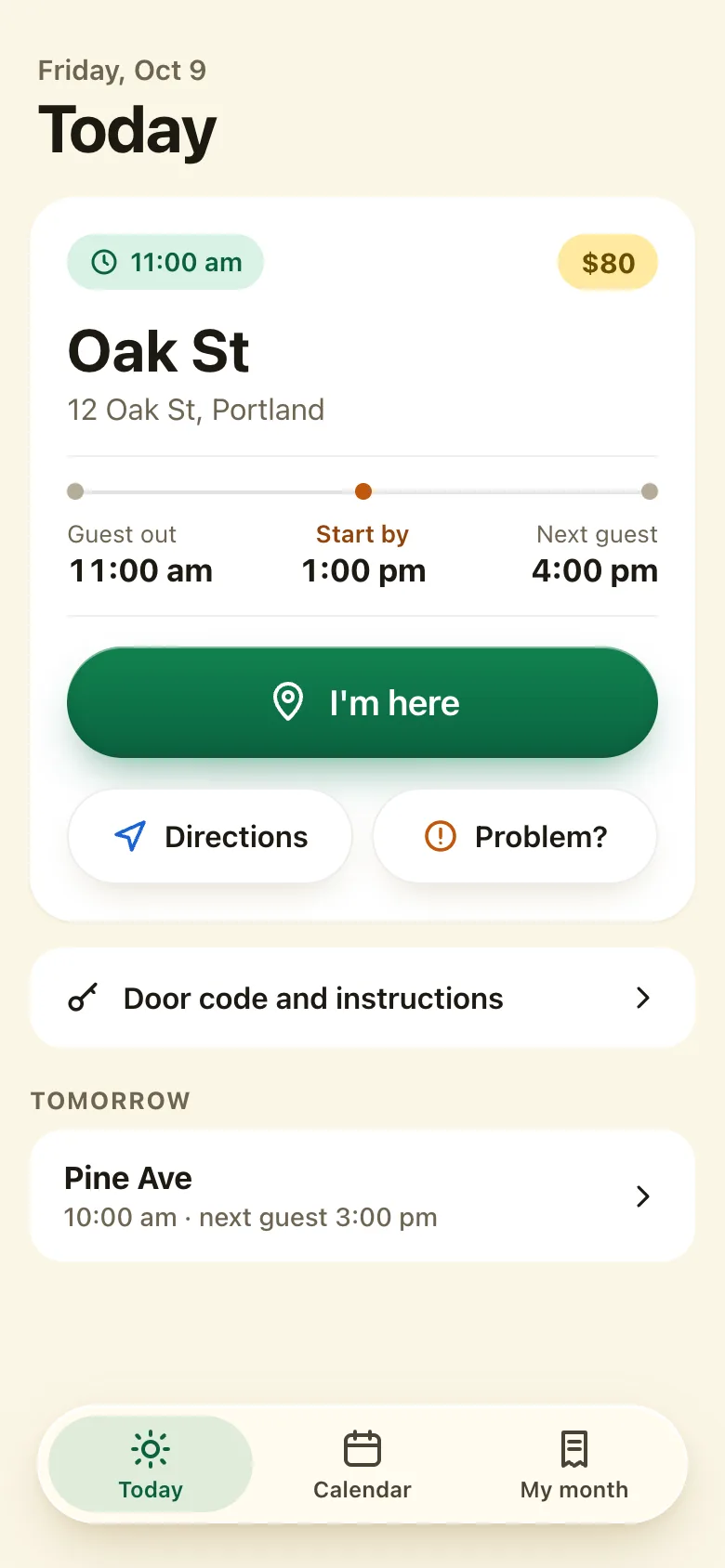
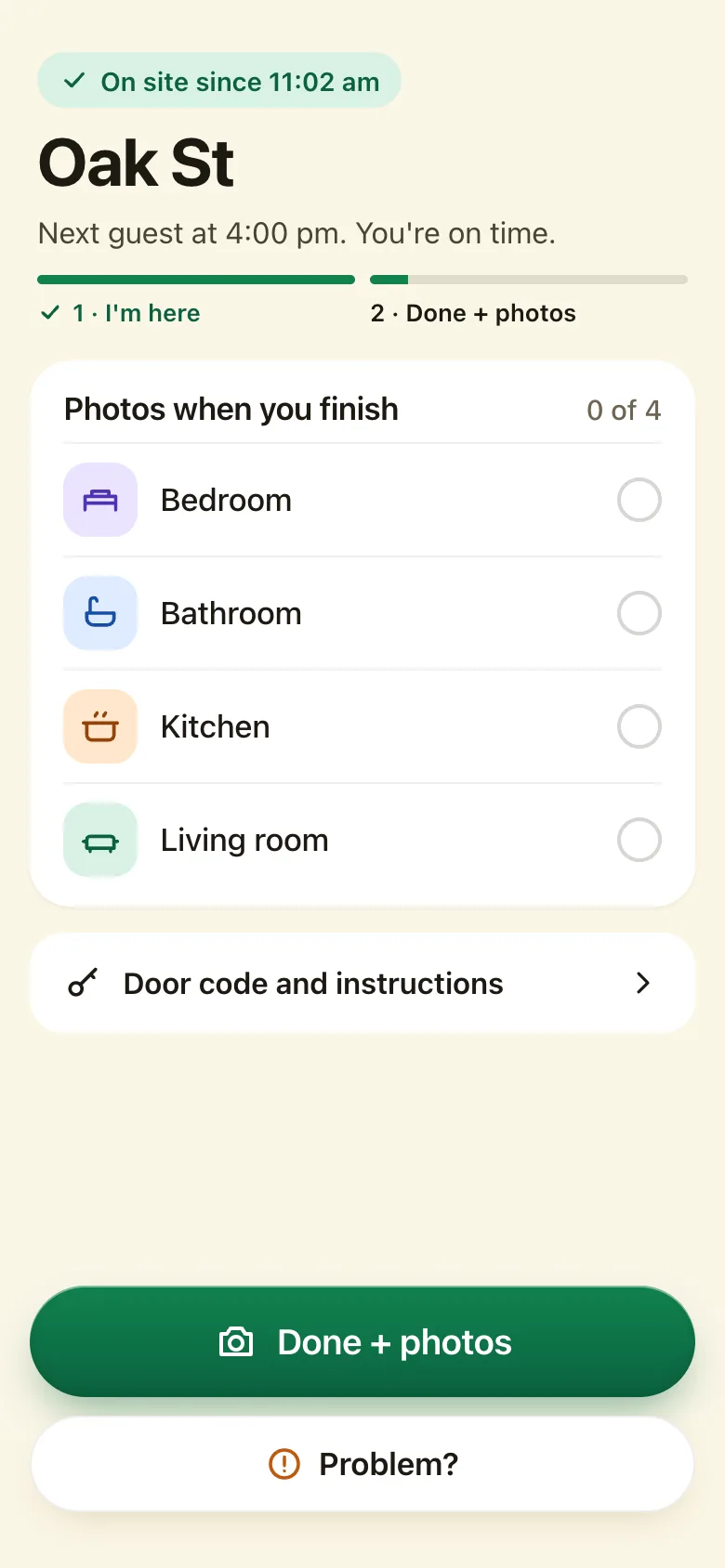
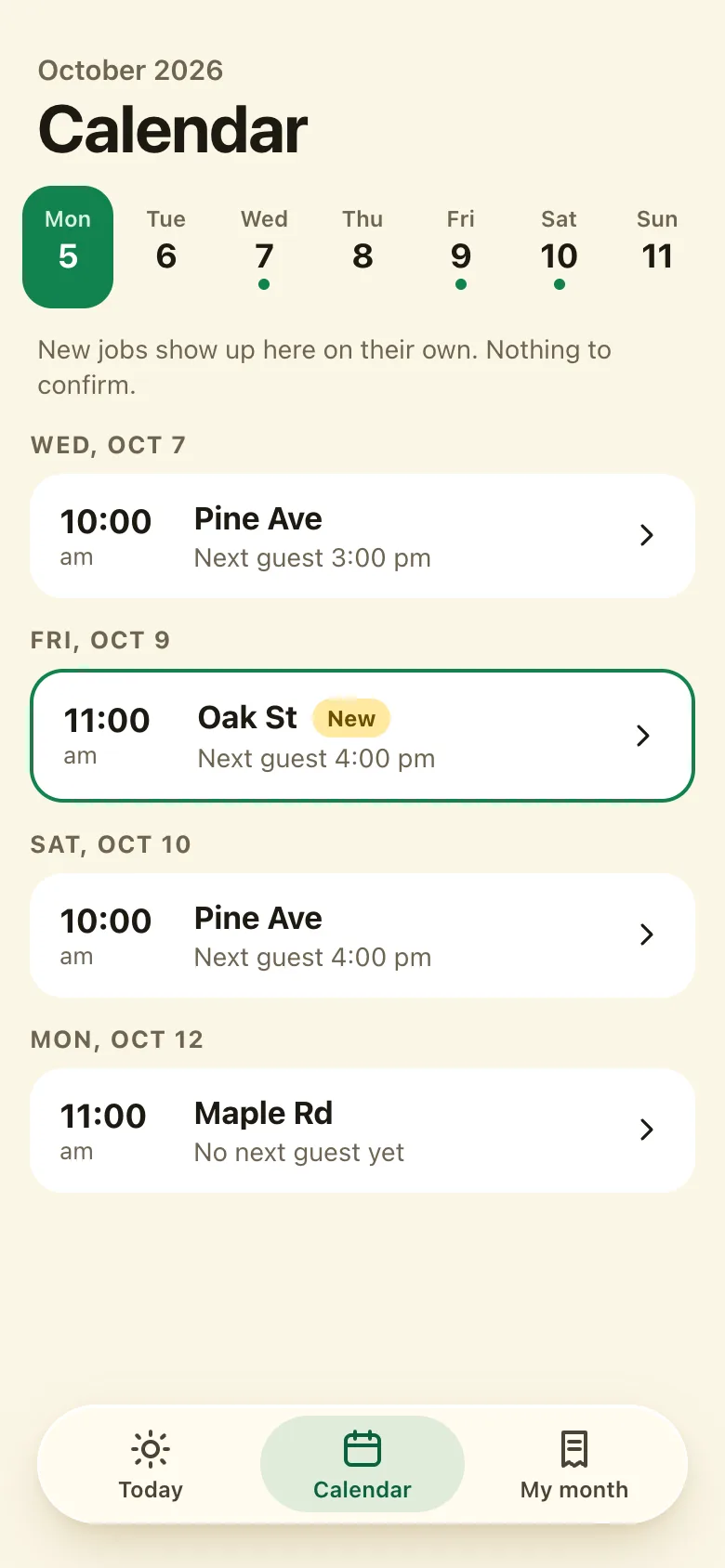
Your cleaner taps I'm here when they arrive and Done + photos at the end. That's the whole app. No password, no training, nothing to confirm ahead. If they can send a text, they can use it.
Scenarios
What happens when…
Pick a situation to see who does what, and when.
- Guest checks out
- 11am
- Next guest arrives
- 4pm
Every scenario as text. Example property: Oak St. The guest checks out at 11am and the next guest arrives at 4pm. Ana is the main cleaner; Maria and Jess are backup cleaners.
1. Everything goes to plan: The normal day
- Mon · Airbnb: New booking. The guest checks out on Friday at 11am. The next guest arrives at 4pm.
- Mon · MopTurn: Turns the booking into a cleaning job and adds it to Ana's schedule.
- Mon · Ana (main cleaner): Gets a notification: Friday 11am, Oak St. Nothing to confirm.
- Thu 6pm · MopTurn: Reminds Ana: tomorrow, Oak St at 11am.
- Fri 11:02am · Ana (main cleaner): Arrives and taps I'm here. The app checks she's at Oak St.
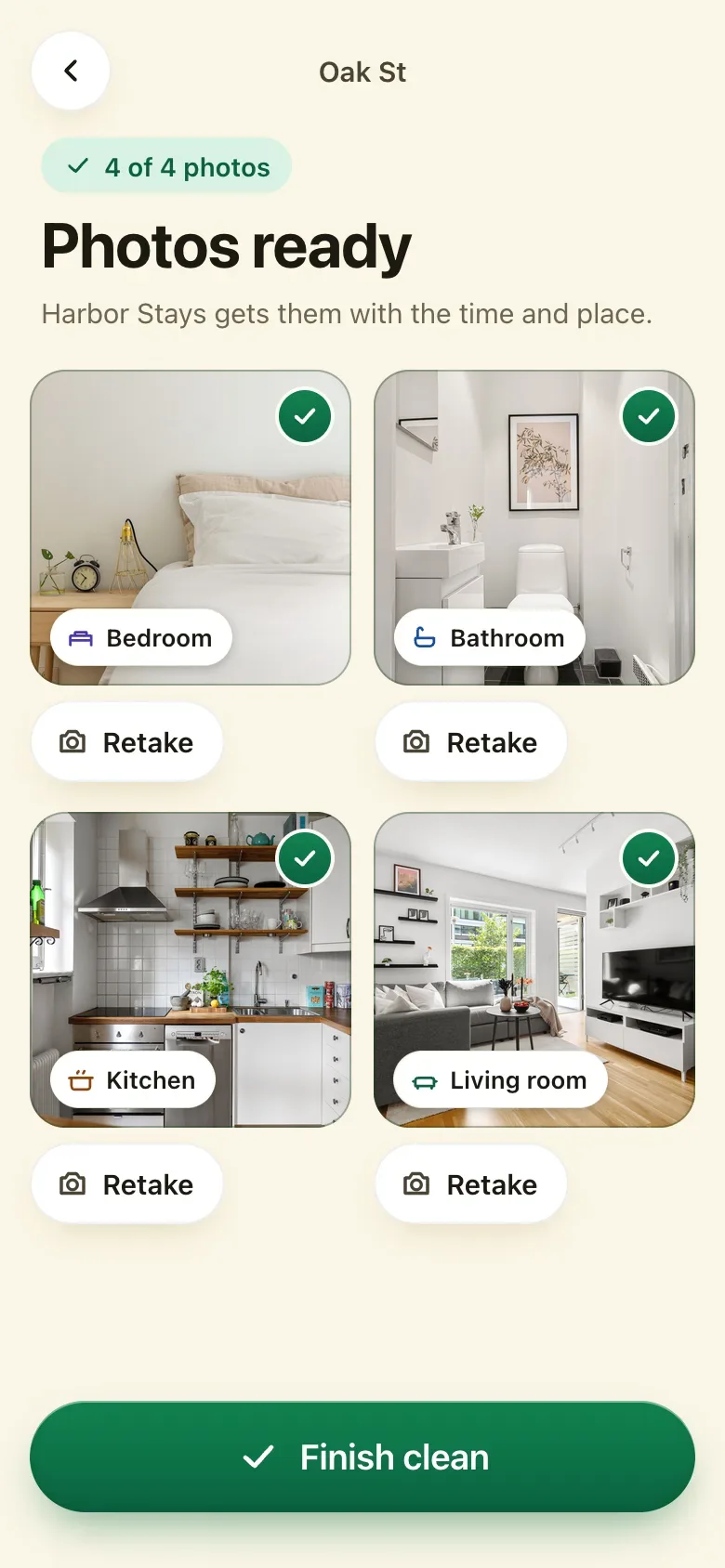
- Fri 1:25pm · Ana (main cleaner): Finishes and takes photos of the rooms in the app. Taps "Done + photos".
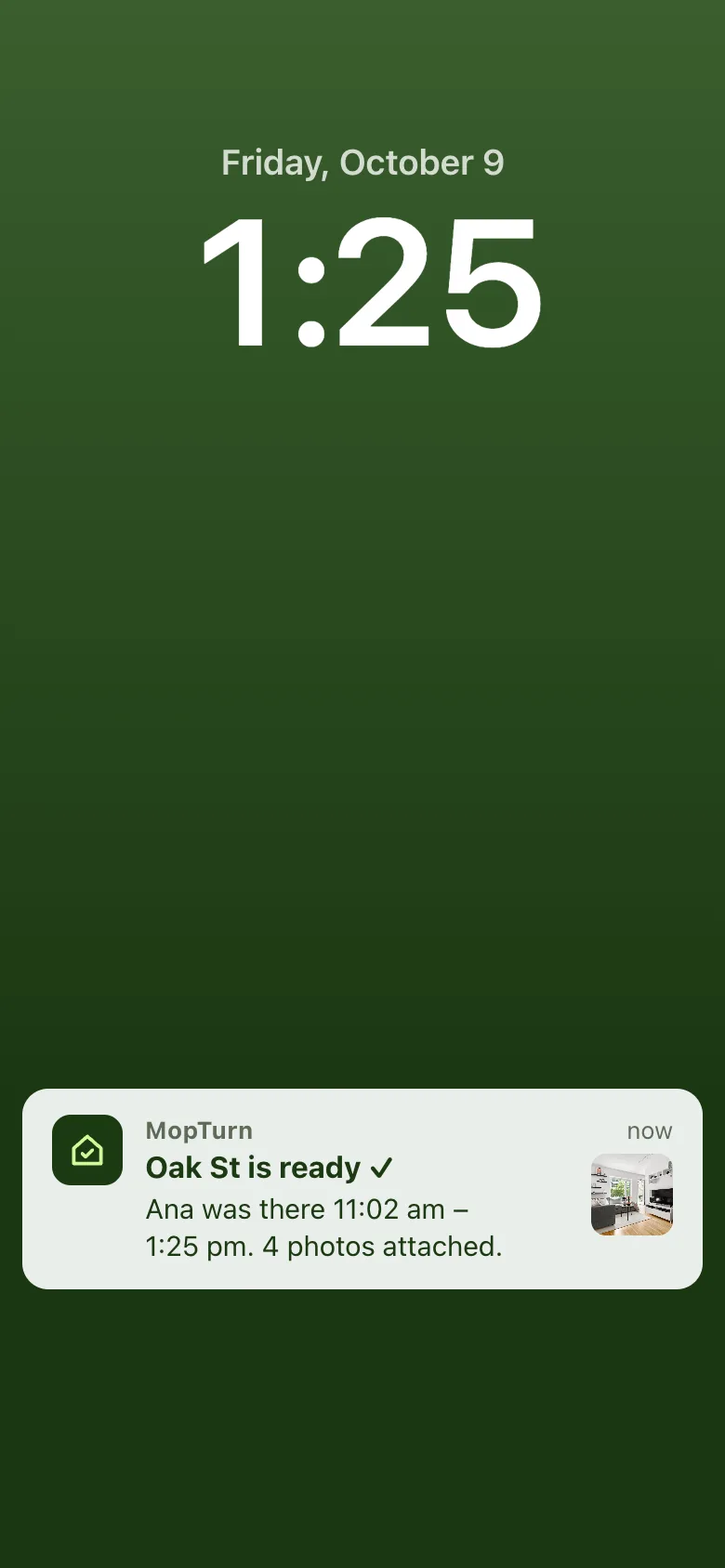
- Fri 1:25pm · You (host), notification: "Oak St is ready ✓". Ana was there 11:02am to 1:25pm. 4 photos attached. No action needed.
Result: The guest arrives at 4pm to a clean home. 1 notification. No input from you.
Good to know: Ana, your main cleaner, taps twice per clean, both at the property. The app learns when she usually arrives and only asks where she is 15 minutes after that.
2. Cleaner doesn't show up: A backup takes over automatically
- Mon · Airbnb: New booking. The guest checks out on Friday at 11am. The next guest arrives at 4pm.
- Mon · MopTurn: Turns the booking into a cleaning job and adds it to Ana's schedule.
- Mon · Ana (main cleaner): Gets a notification: Friday 11am, Oak St. Nothing to confirm.
- Fri 11:15am · MopTurn: Ana hasn't checked in. Asks her if she's at the property.
- Fri 11:30am · MopTurn: Still no answer. Sends Ana a last call.
- Fri 11:30am · You (host), notification: "Ana isn't responding". At 11:45 the job goes automatically to your backup cleaners. No action needed.
- Fri 11:45am · MopTurn: Posts the job to all your free backup cleaners at the urgent rate you set, for example 2x. They have 20 minutes to accept. The first one gets it.
- Fri 11:49am · Maria (backup cleaner): Accepts first and will arrive at 12:20. Jess sees the job is taken.
- Fri 11:49am · You (host), notification: "Maria is covering, arriving 12:20". No action needed.
- Fri 2:43pm · Maria (backup cleaner): Finishes and takes photos. Taps "Done + photos".
- Fri 2:43pm · You (host), notification: "Oak St is ready ✓". Maria was there 12:20 to 2:43pm. 4 photos. No action needed.
Result: The guest arrives at 4pm to a clean home. 3 notifications. Zero calls and zero input from you.
Good to know: This also covers a cleaner who simply forgot. If Ana, your main cleaner, shows up after all, whoever taps I'm here first keeps the job. The other one is told not to come.
3. Nobody can cover: You know by noon
- Mon · Airbnb: New booking. The guest checks out on Friday at 11am. The next guest arrives at 4pm.
- Mon · MopTurn: Turns the booking into a cleaning job and adds it to Ana's schedule.
- Mon · Ana (main cleaner): Gets a notification: Friday 11am, Oak St. Nothing to confirm.
- Fri 11:15am · MopTurn: Ana hasn't checked in. Asks her if she's at the property.
- Fri 11:30am · MopTurn: Still no answer. Sends Ana a last call.
- Fri 11:30am · You (host), notification: "Ana isn't responding". At 11:45 the job goes automatically to your backup cleaners. No action needed.
- Fri 11:45am · MopTurn: Posts the job to Maria and Jess at your urgent rate. They have 20 minutes to accept.
- Fri 12:05pm · Maria, Jess (backup cleaners): The 20 minutes are up. Both passed or didn't answer.
- Fri 12:05pm · You (host), notification: "Nobody has taken Oak St yet". The guest arrives at 4pm, so you still have almost 4 hours. The offer stays open until 1pm. Your call.
Result: You find out at 12:05, not when your guest walks in at 4pm. 2 notifications. Only the last one needs you.
Good to know: The 20 minutes give cleaners time to reply and still leave you an hour before the latest start at 1pm. If someone accepts after 12:05, you know right away.
4. Cleaner can't make it: She knows ahead
- Mon · Airbnb: New booking. The guest checks out on Thursday at 11am. The next guest arrives at 4pm.
- Mon · MopTurn: Adds the job to Ana's schedule and notifies her.
- Mon · Ana (main cleaner): Knows she's busy on Thursday and taps Can't make it.
- Mon · MopTurn: Offers the job to all your backup cleaners at the normal rate. With 3 days to go, the offer stays open.
- Mon 2:10pm · Maria (backup cleaner): Accepts first. The job moves to her schedule. Jess sees it's taken.
- Mon 2:10pm · You (host), notification: "Maria is covering Thursday at Oak St". No action needed.
Result: Covered 3 days ahead without a single text. 1 notification. No input from you.
Good to know: If nobody takes it by Wednesday 6pm, the offer switches to your urgent rate and you get a heads-up. Your monthly report shows how often each cleaner used Can't make it.
5. Cleaner is running late: Late, but still in time
- Mon · Airbnb: New booking. The guest checks out on Friday at 11am. The next guest arrives at 4pm.
- Mon · MopTurn: Turns the booking into a cleaning job and adds it to Ana's schedule.
- Mon · Ana (main cleaner): Gets a notification: Friday 11am, Oak St. Nothing to confirm.
- Fri 11:15am · MopTurn: Ana hasn't checked in. Asks her: Are you at Oak St?
- Fri 11:16am · Ana (main cleaner): Replies that she'll be there at 11:45. Taps "Running late".
- Fri 11:16am · MopTurn: Checks the timing: 11:45 still leaves enough time before the 4pm guest. No alarm.
- Fri 11:44am · Ana (main cleaner): Arrives and checks in. Taps "I'm here".
Result: No false alarm. 0 notifications. You see the delay in your Today view.
Good to know: If she isn't there by 12:00, 15 minutes after her new time, the app asks again and the backup steps follow.
6. Cleaner is there but forgot to tap: No false alarm
- Mon · Airbnb: New booking. The guest checks out on Friday at 11am. The next guest arrives at 4pm.
- Mon · MopTurn: Turns the booking into a cleaning job and adds it to Ana's schedule.
- Mon · Ana (main cleaner): Gets a notification: Friday 11am, Oak St. Nothing to confirm.
- Fri 11:03am · Ana (main cleaner): Is already cleaning, but forgot to tap I'm here.
- Fri 11:15am · MopTurn: Before calling anyone else, asks Ana: Are you at Oak St?
- Fri 11:16am · Ana (main cleaner): Taps I'm here. Her location confirms she's at the property.
Result: No backup called by mistake. 0 notifications.
Good to know: If she doesn't answer, you can call her and tap She's there yourself.
7. Guest cancels or changes dates: Nobody drives out for nothing
- Mon · Airbnb: New booking. The guest checks out on Thursday at 11am.
- Mon · MopTurn: Adds the job to Ana's schedule and notifies her.
- Wed · Airbnb: The guest cancels the booking.
- Wed · MopTurn: Removes the job from Ana's schedule and tells her right away.
- Wed · Ana (main cleaner): It's less than 2 days before the clean, so she taps Got it to show she saw it.
Result: Ana doesn't show up at an empty home. 0 notifications.
Good to know: Changes more than 2 days ahead are just a notification. Inside 2 days she taps Got it, and if she doesn't within 2 hours, the app reminds her again.
8. Guest hasn't left yet: Late checkout
- Mon · Airbnb: New booking. The guest checks out on Friday at 11am. The next guest arrives at 4pm.
- Mon · MopTurn: Turns the booking into a cleaning job and adds it to Ana's schedule.
- Mon · Ana (main cleaner): Gets a notification: Friday 11am, Oak St. Nothing to confirm.
- Fri 11:05am · Ana (main cleaner): Arrives, but the guest is still packing. Taps Guest still here.
- Fri 11:05am · MopTurn: Pauses the clock, so no backup is called. A few minutes late is normal, so you aren't bothered yet.
- Fri 11:30am · You (host), notification: "Guest at Oak St is 30 min past checkout". Ana is waiting at the property. Optional: message your guest.
- Fri 11:40am · Ana (main cleaner): The guest leaves and Ana starts cleaning. Taps "Guest left".
- Fri 11:40am · MopTurn: Checks the timing: done by about 2pm, well before the 4pm guest ✓
Result: You know why it's late without calling anyone. 1 notification.
Good to know: If the guest stays so long that the clean can't finish before 4pm, you get an alert right away.
9. Last-minute booking: A guest for today
- Mon · Airbnb: New booking. The guest checks out on Friday at 11am. No one is booked after.
- Mon · MopTurn: Adds the job to Ana's schedule for Friday. With no next guest there's no rush, but the clean is still on checkout day.
- Fri 9:41am · Vrbo: Instant booking. A new guest arrives today at 4pm.
- Fri 9:41am · MopTurn: The clean must now start by 1pm. Ana usually arrives at 11am, so it still works. Tells her about the new guest.
- Fri 9:50am · Ana (main cleaner): It's a change on the day, so she taps Got it.
- Fri 9:50am · You (host), notification: "New guest today at 4pm. Ana is on it ✓". No action needed.
Result: Sorted in 10 minutes. 1 notification. No input from you.
Good to know: Every clean happens on checkout day, so the home is ready for surprise bookings. If Ana, your main cleaner, taps Can't make it, the job goes straight to your backup cleaners at the urgent rate.
10. No guest until Friday: No panic, no extra cost
- Mon · Airbnb: New booking. The guest checks out on Wednesday at 11am. The next guest arrives Friday at 4pm.
- Mon · MopTurn: Turns the booking into a cleaning job and adds it to Ana's schedule.
- Mon · Ana (main cleaner): Gets a notification: Wednesday 11am, Oak St. Nothing to confirm.
- Wed 11:15am · MopTurn: Ana hasn't checked in. Asks her if she's at the property.
- Wed 11:30am · MopTurn: Still no answer. Sends Ana a last call.
- Wed 12pm · MopTurn: The next guest is 2 days away, so there's no rush. Offers the job to your backup cleaners at the normal rate, to be done by Thursday evening.
- Wed 12pm · You (host), notification: "Ana isn't responding about Oak St". Offered to your backup cleaners at the normal rate. Friday's guest isn't at risk. No action needed.
- Wed 12:40pm · Jess (backup cleaner): Accepts and picks Thursday at 10am. Taps "Accept · Thu 10am".
- Wed 12:40pm · You (host), notification: "Jess is cleaning Oak St on Thursday at 10am". No action needed.
Result: Ready before Friday, at the normal rate. 2 notifications. No input from you.
Good to know: If Ana, your main cleaner, answers first, she keeps the job. If a same-day booking comes in, the job becomes urgent right away.
11. No signal at the property: The check-in still counts
- Mon · Airbnb: New booking. The guest checks out on Friday at 11am. The next guest arrives at 4pm.
- Mon · MopTurn: Turns the booking into a cleaning job and adds it to Ana's schedule.
- Mon · Ana (main cleaner): Gets a notification: Friday 11am, Oak St. Nothing to confirm.
- Fri 11:02am · Ana (main cleaner): Taps I'm here at the door, but there's no signal.
- Fri 11:02am · MopTurn: Saves her check-in with the time and place and sends it as soon as the signal comes back.
- Fri 11:31am · MopTurn: Oak St is marked as a weak-signal property, so the app waits longer before asking anyone. No false alarm.
- Another day · Ana (main cleaner): Her phone only shares an approximate location. The app asks for her precise location, just for this tap.
- Another day · Ana (main cleaner): Her location doesn't work, so the app can't confirm she's there. She takes a photo of the front door instead.
- Another day · MopTurn: Shows you her front-door photo instead of a ✓ in your Today view. No alarm.
Result: A bad signal never calls a backup by mistake. 0 notifications.
Good to know: Location is only checked when she taps I'm here or Done. It's never tracked in the background.
12. Adding your cleaner: One link, no password
- Day 1 · You (host), notification: "Invite Ana with a link". Send it by text or WhatsApp, like any other message. One-time setup.
- Day 1 · Ana (main cleaner): Opens the link, types her name and picks English or Español. No password. Taps "Join the team".
- Day 1 · Ana (main cleaner): Turns on notifications, so new jobs and changes reach her.
- Day 1 · Ana (main cleaner): Sees how it works: two taps per clean.
- First clean · Ana (main cleaner): The first time she taps I'm here, the app shows her exactly what you'll see. Then she allows location while using the app.
Result: Your cleaner is set up in a few taps. No password and nothing to confirm, ever.
Good to know: Backup cleaners join the same way. Nothing is assigned to them until a job is offered.
Check-in + photo proof
Know they showed up.
See that it's done.
When your cleaner taps I'm here, the app checks they're at the property. Done needs photos. Nothing is tracked in between.
- No location? You get a photo of the front door instead.
- Photos of the rooms you choose, from the app's camera, never the gallery.
- A clean much shorter than usual gets flagged.
- Photos keep cleans careful and protect your cleaner if a guest complains.
What your cleaners get
Your cleaners will actually want it.
It takes work off their plate instead of adding to it.
- A schedule that's always right. No more "what time is checkout tomorrow?" at 9pm.
- Cancellations arrive right away, so nobody drives out for nothing.
- Never tracked. Location is checked only when they tap I'm here and Done, and you see a ✓ with the time, never a map.
- Extra urgent jobs at a better rate, for backups who want them.
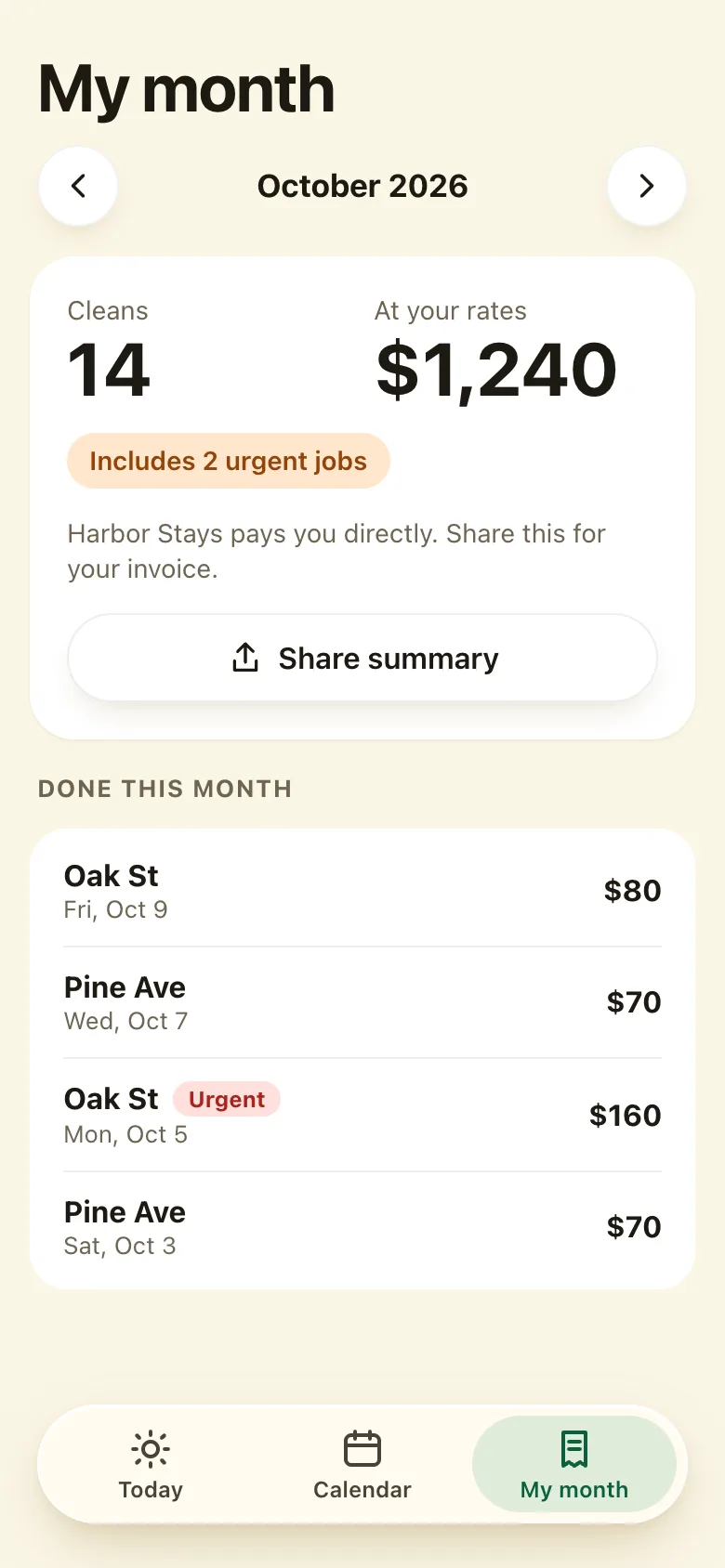
- A monthly list of every clean, ready for their invoice.
Integrations
Works with Airbnb, Booking.com and Vrbo.
Through your PMS, or just your calendar links if you don't use one.
Through your PMS











FAQ
Questions hosts ask.
Something else?
When can I use it?
We're launching at the end of December. Join the waitlist and you'll be among the first to get access.
Does it connect straight to Airbnb, Booking.com and Vrbo?
It connects through your PMS, or through the calendar links Airbnb, Booking.com and Vrbo give every host. You don't need a PMS to start.
Which PMS plan do I need?
- HospitableHost plan or higher
- SmoobuAny Professional plan
- OwnerRezAny subscription
- HostawayPlans with API access
- GuestyPro or Enterprise (not Lite)
- LodgifyProfessional or higher
- HostfullyWith the Open API add-on
- Beds24Any account
- UplistingAPI access enabled by Uplisting
- iGMSPro or Pro+
- TokeetAny paid plan
- AvantioAPI access enabled by Avantio
What if I only use calendar links?
It works, with two limits. Calendar links don't include checkout and check-in times, so you set your standard times for each property once. They also update with a delay that depends on Airbnb, Booking.com or Vrbo. With a PMS, changes reach your cleaner faster.
Do my cleaners pay anything?
No. The app is free for your cleaners. They need an iPhone or an Android phone.
What languages does the app speak?
English and Spanish from day one, and each cleaner picks their own. If your team needs another language, tell us and we'll add it.
How do I know my cleaner was really there?
When they tap I'm here, the app checks they're at the property, and you see a ✓ with the time. If location doesn't work, they take a photo of the front door and you see that photo instead. At the end, Done needs photos taken in the app's camera, each with the time and place.
Is my cleaner's location tracked?
No. Location is only checked at two moments: when they tap I'm here and when they tap Done. Nothing runs in the background. You see a ✓ and the time, never a map.
What if nobody accepts the job?
You get an alert early enough to act: move the check-in, call a cleaning service or clean it yourself. The offer stays open, and if someone accepts later, you know right away.
Who can be a backup cleaner?
Anyone on your team who isn't the main cleaner at that property: another one of your cleaners, a friend, someone from a local group. They only get a job when you need them.
Does it pay my cleaners?
Not yet. You get a monthly report of who cleaned what, with urgent jobs marked. You pay them the way you do now.
How much will it cost?
Pricing comes with the launch. Join the waitlist and you'll hear it first.
Who is it for?
Hosts and managers with a few units, usually 2 to 10, on Airbnb, Booking.com and Vrbo, who work with their own cleaners.